Smart thermostat not heating when you switch to heat? Nest, ecobee and Honeywell messages explained
In short
You switched the thermostat to heat for the first time since spring and nothing happened. Before you call anyone, find out what "Wait", "Delayed" and "Calibrating" actually mean on Honeywell, Nest and ecobee, and which smells mean turn it off now.
When a smart thermostat says it's heating but no warm air arrives on the first cold day of fall, it's usually waiting out a built-in protection delay, set to the wrong mode, or not getting steady power from the furnace. Urgency: give it five to ten minutes first, then work through the checks below; it's stop now only if you smell gas, smell burning plastic or wiring, or see smoke.
This covers Google Nest Learning Thermostat and Nest Thermostat E, ecobee smart thermostats, and Honeywell Home (Resideo) thermostats connected to a forced-air furnace or a heat pump, as described on each maker's current support pages. Messages differ between models, so match the wording to what your own screen shows.
Safety first: gas furnaces
If you smell gas (a rotten-egg or sulfur smell) near the furnace or anywhere in the house:
- Don't touch the thermostat, light switches or anything electrical, and don't light anything. A switch or phone can make a spark.
- Get everyone out of the house.
- Call your gas utility's emergency line or 911 once you're outside and well away from the building.
- Don't go back in, and don't turn the gas back on yourself. The gas company or a qualified technician does that.
That advice comes from state utility regulators such as the Missouri Public Service Commission and Connecticut's Public Utilities Regulatory Authority. Nothing in this guide involves opening the furnace, touching gas valves or working on wiring. Those are jobs for a licensed HVAC technician.
The delay messages that look like a fault
Most smart thermostats deliberately hold off for a few minutes before starting the equipment. On the first switch to heat, that delay is often the whole story.
Honeywell Home. Honeywell says its thermostats have a built-in delay of about five minutes to protect your equipment. The screen shows "Wait", or "Heat On" (or the flame icon) flashes. Some models word it differently: the X1N shows "Waiting for Equipment". Honeywell's advice is to wait five minutes for the system to respond. If it's still flashing after that, it can point to a voltage problem at the thermostat, which is a technician job.
Google Nest. Google lists a "Delayed" or "Starts in" message with a countdown as one of the signs that the thermostat isn't getting consistent power from your system. Without a common (C) wire, a Nest relies on the little power it can draw through your system's other wires to keep its battery charged, and when that falls short it can hold back the heating. A related alert, "No power", appears with help codes E298, E448 or M20. Google's fix for both is a C wire or a Nest Power Connector. That means work on the thermostat and furnace wiring, so have a Nest Pro or an HVAC technician do it.
ecobee. ecobee's screen can show "Calibrating: Heating and Cooling Disabled". ecobee says this means the thermostat has just regained power and is recalibrating its sensor. If it keeps happening right after the heat starts, the thermostat is losing power during heating calls, and ecobee names the most common cause as a dirty furnace filter: restricted airflow lets the furnace overheat, a safety device called the high-limit switch trips, and that cuts power to the thermostat.
ecobee also only calls for heat once the room is below your set temperature by a small margin, the heat differential. ecobee's default is about 0.6 to 1°F (0.3 to 0.5°C), so setting the thermostat just half a degree above room temperature may not start anything.
Checks, simplest first
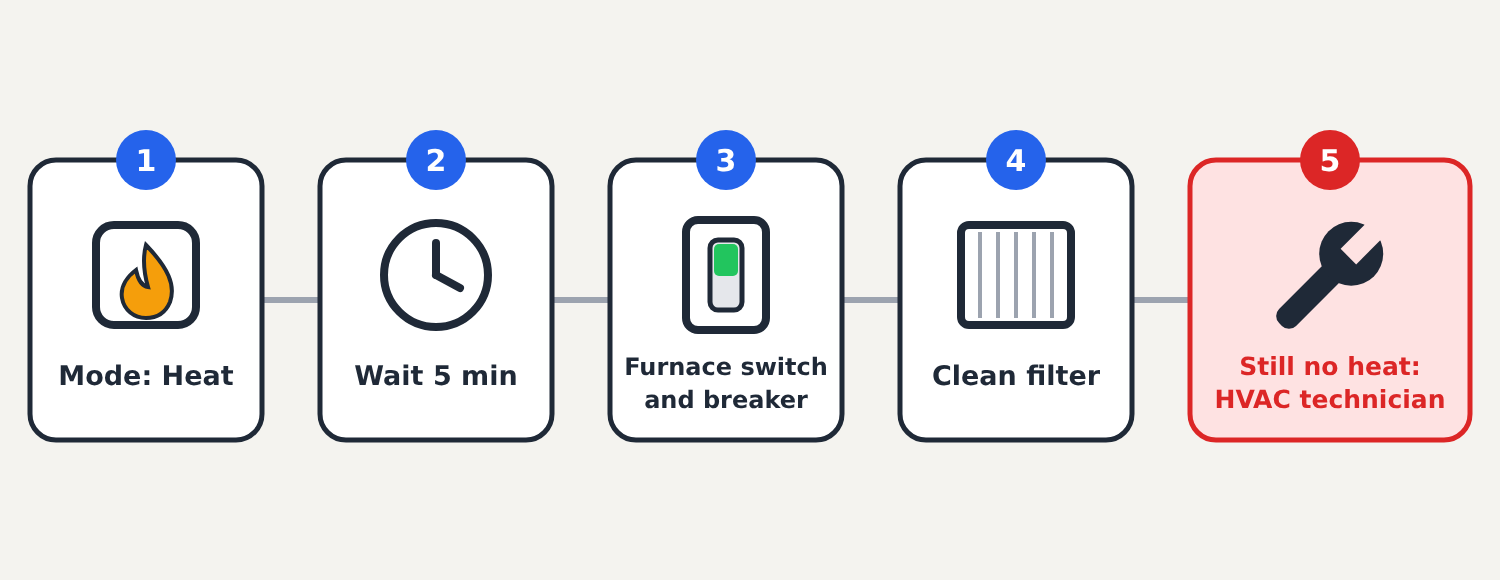
- Check the mode and set point. After a summer on Cool or Off, the system mode has to be Heat (or Heat/Cool), and the target temperature has to be a couple of degrees above the room temperature. Check for an active schedule or eco/away setting holding the temperature down.
- Wait out the delay. Give it five to ten minutes after changing the mode. Honeywell's flashing message and Nest's countdown are both normal for that long.
- Check the furnace power switch and breaker. Honeywell points out that there is usually a switch near the furnace that looks like a light switch; make sure it's on. Check that the furnace's breaker hasn't tripped. Also make sure the furnace's front panel is closed properly, because Honeywell notes some systems won't power up unless the cover is fully closed. If the breaker trips again after you reset it, leave it off and call a technician.
- Replace the filter. ecobee names a clogged filter as the most common cause of its repeated calibrating message, and the same blocked airflow can make any furnace overheat and shut itself off. ecobee's advice is to shut off power to the furnace before you check it, then replace the filter if it's dirty.
- Look at the app. If the Nest, ecobee or Honeywell Home app shows the thermostat as offline, that's a Wi-Fi problem and the heating may still work from the thermostat itself; our guide to the "Connected, no internet" message helps sort out whether it's your router or your provider.
Heat pumps: a cold-weather lockout
If you have a heat pump with no backup heat, ecobee's thermostats have a setting called Compressor Min Outdoor Temperature that stops the heat pump running below a set outdoor temperature. ecobee's default is 35°F (1.7°C). ecobee warns that running the compressor below what it can handle can damage it, so check with the heat pump's manufacturer or your installer before changing it.
The first-run smell
A dusty, slightly burnt smell for a short while after the first heating cycle of the season is normal: dust that settled on the burners and heat exchanger over the summer is burning off. Trane says it should clear in about 10 to 15 minutes; Carrier gives anywhere from 30 minutes to a few hours.
These smells are not normal:
- Rotten eggs or sulfur: possible gas leak. Follow the safety steps at the top.
- Burning plastic or hot wiring: turn the furnace off at its switch and call an HVAC technician. Trane says an electrical burning smell can mean a more serious problem.
- A sharp metallic smell: Trane warns it can be a sign of a cracked heat exchanger. Turn the heat off and have it inspected before using it again.
- A dust smell that lasts past a few hours or gets stronger: have the system checked.
When to call an HVAC technician
Book a technician when the thermostat shows it's calling for heat and the furnace still doesn't start after you've done the checks above; when the breaker trips again; when "Wait", "Delayed" or "Calibrating" messages keep coming back; or when the furnace's own status light is flashing an error code. The thermostat makers say the same: Google suggests contacting a local professional if the system also fails with your old thermostat, and Honeywell refers persistent problems to a pro installer.
The same cold week tends to catch phones out too; here's why phones drain or shut down in the cold.
Sources: Google Nest Help: "Learn about the common or C wire", "Troubleshoot a 'No power' alert on a Nest thermostat (E298, E448 or M20 help code)", "Troubleshoot when your thermostat won't turn on". ecobee Support: "My ecobee thermostat keeps losing power and displaying a 'calibrating' message", "Heating: Basics and FAQ", "Threshold settings for ecobee thermostats". Honeywell Home: "Why is my thermostat display showing 'wait,' 'waiting for equipment,' or flashing 'cool on'?", "Why is my heating system not working?". Trane: "Help! My furnace smells like burning". Carrier: "Burning smell in house". Missouri PSC and Connecticut PURA gas safety guidance.
